iOS Bootcamp: learning to create awesome apps on iOS using Swift
Posted on | May 12, 2015 | No Comments
 I teach a couple of courses here at GVSU on mobile app development, both at the undergraduate and graduate level. Normally, I record my lectures and make them available to students taking the course via Blackboard. Since we are switching to Swift (from Objective-C) this year, I’ve had a number of past students and others express interest in the course material, so this summer (2015) I’ve decided to make all of the lecture recordings / notes available right here to anybody who wants them.
This material has been delivered in a bootcamp fashion, e.g. a lot of material covered over a very short period of time (6 weeks total). We will be posting lectures, the notes, and source code examples available as we go, so check back often for updates.
I’m making this material available for free to anybody interested in learning Swift / iOS. All I ask is that you Tweet this page, share on Facebook, G+ and/or anywhere else you happen to hang out online. If you are another instructor teaching a similar course, I’d love to hear from you. Feel free to incorporate in your own course if you find it useful – just give credit by linking back to this page. However, please don’t rip off my videos and post them on YouTube as your own – I will find them, and have YouTube shut you down real quick once I do. 🙂
Here is the course outline. Follow the links to watch the lectures and/or download the notes and other materials.
All of the source code examples discussed in these lectures are being posted on github.
Lecture 00 – Introduction to Mobile Application Development.
- Lecture Topics:
- Mobile Past, Present Future
- Why Develop for Mobile?
- The Mobile Development Landscape
- Why Develop for iOS?
- Watch the entire lecture on YouTube: https://youtu.be/Xi6LfpMEVQE
- View / Download the lecture notes.
Lecture 01 – Xcode, iOS Overview.
- Lecture Topics:
- The Tools – Xcode and friends.
- iOS Model / View / Controller design pattern.
- Watch the entire lecture on YouTube: https://youtu.be/XchvSH4EYEk
- View / Download the lecture notes.
Lecture 02 – Introduction to the Swift Programming Language
- Lecture Topics
- Swift Language Overview
- The obligatory “Hello, world!”
- Variables and constants
- Strings
- Collection Types
- Control Flow
- Functions
- Watch the entire lecture on YouTube: http://youtu.be/fwstpDs2biQ
- View / Download the lecture notes.
- Get a copy of the sample code on github.
- Download Homework #1 (you’ll need some info from Lecture 3 to complete)!
Lecture 03 – Swift: Beyond the Basics
- Lecture Topics
- Closures
- Optionals
- Enums
- Structs
- Classes (with the “RocketShip” code demo)
- convenience and designated initializers
- inheritance / subclassing
- overriding methods
- Protocols
- Watch the entire lecture on YouTube: http://youtu.be/zUVDq9cJFvM
- View / Download the lecture notes.
- Get a copy of the sample code on github.
- Download Homework #2.
Lecture 04 – iOS Essentials
- Lecture Topics
- Understanding the Model – View – Controller architecture (watch video)
- The “Greeting” coding demo (watch video)
- ViewControllers, and the ViewController lifecycle (watch video)
- The “LifeCycle” coding demo (Watch: TBD)
- The “StopWatch” coding demo (watch video)
- Watch the entire lecture on YouTube.
- View / Download the lecture notes.
- Get a copy of the sample code on github.
- Download Homework #3.
Lecture 05 – The Essentials of iOS TableView Controllers / Navigation Controllers
- Lecture Topics
- More about View Controllers (watch video)
- Navigation Controllers (watch video)
- TableView Controller overview (watch video)
- Static TableViews coding demo (watch video)
- Dynamic TableViews coding demo (watch video)
- Edit TableViews coding demo (watch video)
- Watch the entire lecture on YouTube (TBD)
- View / Download the lecture notes.
- Get a copy of the sample code on github.
- Download Homework #4. Download the data.json input file.
Lecture 06 – More iOS User Interface Considerations
- Lecture Topics
- AttributedStrings: Making text pretty (watch video)
- Working with AttributedStrings code demo (watch video)
- AutoLayout: Getting things to layout correctly (watch video)
- AutoLayout code demo (watch video)
- AutoRotation: Supporting different screen orientations (watch video)
- AutoRotation code demo (watch video)
- Watch the entire lecture on YouTube
- View / Download the lecture notes.
- Get a copy of the sample code on github.
- Download Homework #5.
Lecture 07 – Threading, Web APIs, UIWebViews and more!
- Lecture Topics
- Bridging Swift and Objective-C.
- iOS Thread Model
- Accessing Web APIs in iOS
- TopTracks Demo – Accessing a Web API in iOS. (watch video)
- TopTracks Demo – Hooking up the UIActivityIndicator. (watch video)
- TopTracks Demo – Working with UIWebView. (watch video)
- Watch the entire lecture on YouTube
- View/download the lecture notes.
- Get a copy of the sample code on github.
- Download Homework #6.
Lecture 08 – Mobile Computing and the Cloud
- Lecture Topics
- MBaaS: Mobile Backend as a Service. (watch video)
- Using parse.com to add a backend to your iOS App.
- Setting up Parse Demo (watch video)
- Using parse.com to manage users. (watch video)
- Demo: Supporting User Signup / Facebook in Parse.com (watch video)
- Watch the entire lecture on YouTube
- View/download the lecture notes.
- Get a copy of the sample code on github.
Lecture 09 – Using 3rd Party Libraries / Frameworks in iOS
- Lecture Topics
- Motivation. (watch video)
- Inventory of useful 3rd party iOS libraries/frameworks.
- Working with CocoaPods to manage external dependencies.
- Demo: Using CocoaPods. (watch video)
- Watch the entire lecture on YouTube
- View/download the lecture notes.
- Get a copy of the sample code on github.
Lecture 10 – Working with the iOS CoreLocation Framework and with the Google Maps SDK
- Lecture Topics
- The fundamentals (watch video)
- Working with CoreLocation.
- Working with Google Maps SDK for iOS
- Demo: Getting started with Google Maps SDK for iOS. (watch video)
- Watch the entire lecture on YouTube
- View/download the lecture notes.
- Get a copy of the sample code on github.
Lecture 11 – Extending the reach of your iOS app
- Lecture Topics
- Motivation (view video)
- Custom URL schemes
- Demo: Working with URL Schemes (watch video)
- App Extensions
- Demo: working with app extensions (watch video)
- Watch the entire lecture on YouTube
- View/download the lecture notes.
- Get a copy of the sample code on github.
Successfully Integrating Web Services Into Your Android Apps
Posted on | November 29, 2012 | 9 Comments
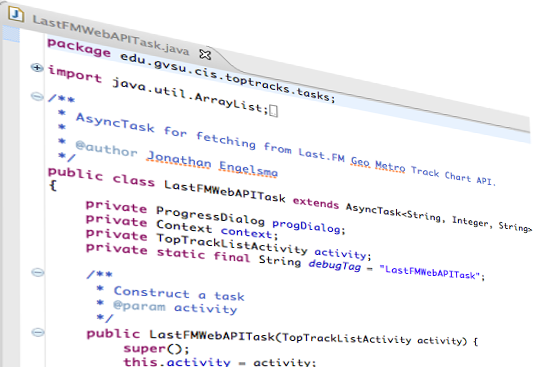 One of the things I’ve noticed budding Android developers struggle most with is how to properly integrate content being pulled form web services into their Android apps. Many of them have been focusing exclusively on figuring out layouts and other user interface related issues and haven’t yet developed an understanding of the underlying threading model in Android, and the fact that you don’t want to do network IO (or anything that takes time for that matter!) on the “main” thread. Some of them have already discovered ASyncTask, but find the documentation a bit difficult to digest or simply lack a nice clean comprehensive working app that demonstrates the concepts. I recently posted a screencast on YouTube (embedded below) that is actually a recording of a portion of a lecture I give in my mobile app develop course here at GVSU. The video seems to be getting a fair amount of views on YouTube for the short time its been available and I’m also getting a number of requests for the source code.
Download the source code on github.
In this video I walk through the implementation of a fictitious app I implemented called TopTracks. The app uses publicly available web services on the Last.FM music social network to display the current most popular music tracks among Last.FM users in various metro areas across the United States. In the course of the code walkthrough we cover how to actually issue the HTTP requests, how to parse the JSON result strings we receive in response, and how to properly code this up in an ASyncTask in a way that moves the time consuming network fetch into a background thread, but still giving us the opportunity to update the view hierarchy with the main thread once the fetch completes. We also take a look at a custom ListView Adapter to demonstrate a typical user interface for displaying an array of data fetched from a network service. The source code covered in the screencast is available here.
If you are in the process of learning to develop for the Android platform, you might be interested in a series of Android screencast tutorials I’ve given in my lectures and made available on YouTube. I’ve embedded the playlist below.
GIMP goes native on OS X!
Posted on | October 6, 2012 | 1 Comment
 In case you’ve been living in a cave (as I apparently have been…) GIMP has now gone native on OS X! GIMP is a fully featured image editor that works awesome and is totally free. I used to use Adobe Photoshop, but grew tired of paying big $$ for updates. After I gave GIMP a try, I never looked back.
A minor problem, is that in the past it required XQuartz or Apple’s X11, but not any more! The 2.8.x release now runs native on OS X, so now you simply download the dmg image and drag GIMP over to your Application folder, and bingo, you have one of the slickest image editors on the planet!
I’m sure the serious graphic designer types can justify shelling out lots of $$ for a commercial image editor, but for the legions of us who need to simply get the job done this is a fantastic package.
Kudos to the talented team of developers who dedicate all their energy and love to this magnificent piece of software. If you haven’t tried GIMP yet, go download your copy now!
iOS6 Maps Are Disappointing
Posted on | September 21, 2012 | No Comments
I recently installed the iOS6 refresh on my now ancient iPhone 4. I love the new “It’s your call” features, and the new “Do Not Disturb” feature adds utility to my phone as well. I also upgraded my wife’s slightly less ancient iPhone 4S and tried out the features not available on my older iPhone. The turn-by-turn navigation feature is awesome, but I sure wish that was supported on my iPhone 4. The flyby feature in maps is a cool demo, but offers very little value to me as an end user. (I gave up my hang gliding around the Chicago loop past-time when I moved back to the green pastures of W. Michigan.) The panorama feature was nice, but not nearly as impressive as what you can do with Microsoft’s PhotoSynth app (thank you Juan Mejia for pointing this out to me) that has been available on iOS since last May.
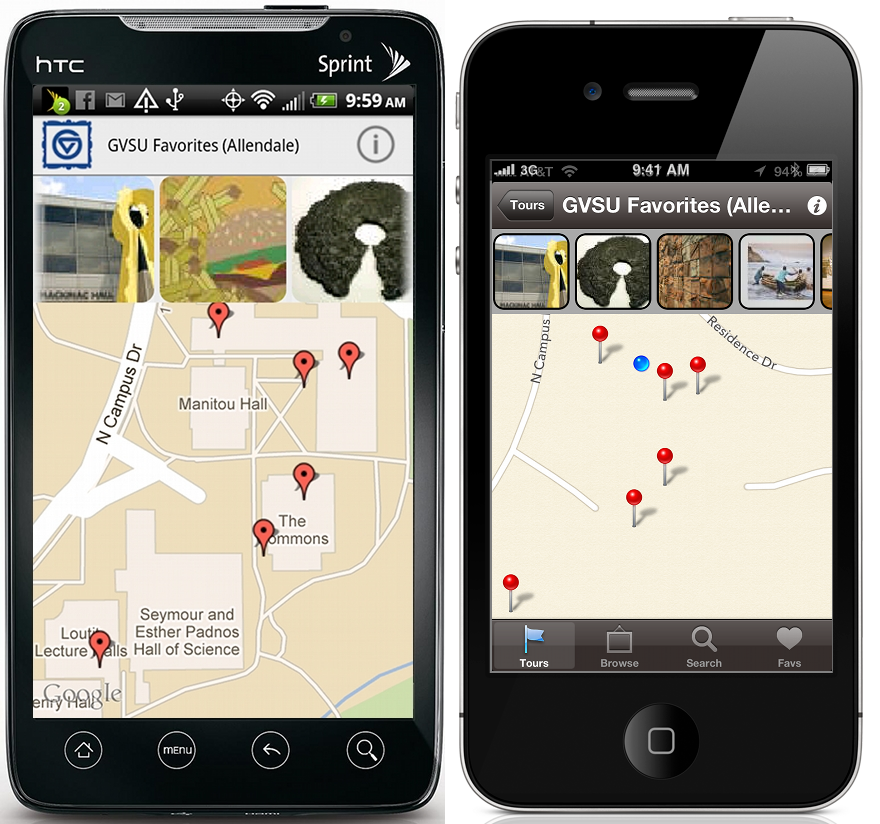
Maps in the Android version of “Art at GVSU” (on the left) compared to maps in the Apple version of the app running on iOS6.
Wearing my developer’s hat, my biggest gripe is the lack of quality in Apple’s (Tom Tom’s?) map content. Here at GVSU we have a number of campus apps that utilize map views. For a long time now, Google Maps showed the outlines and names of all of the buildings on GVSU campuses, which was really helpful. For example, our recently published “Art at GVSU” app features a number of campus art tours that help people navigate various collections of art around campus. The art works are all geotagged and Google’s map content made it really easy to find the approximate location of the artwork. With the new iOS6 update, the maps make it look as though campus is a barren desert! (See figure above.). This of course is just the tip of the iceberg, there are a few other blemishes that need some attention as well.
We’re used of Apple playing games just to extract more $$ from our wallets (e.g. limit certain features to newer models only that could be adequately supported on older phones). Apple’s stock price indicates most of us don’t have a problem with that. What we are not used to getting from Apple is an altogether inferior product! Given all the chatter on this issue out there, hopefully the folks in Cupertino have gotten the message and improvements are on the way. If not, we always have the shiny new Google Maps app for iOS to look forward to.
The “Mobile Moves Michigan” Conference
Posted on | July 18, 2012 | No Comments

Fellow Michiganders, are you interested in broadening your mobile tech horizons this summer? If so, you’ll definitely not want to miss the upcoming Mobile Moves Michigan Conference @ The Motor City Casino in Detroit Michigan on July 30-31, 2012. The event, hosted by the Mobile Technology Association of Michigan, includes the Mobile/Wireless Technology Symposium (7/31), a mobile developer conference and Hack-a-thon (7/30 & 7/31) and mobile technology Exhibition (7/31). Learn about the Mobile Technology industry in Michigan and see how it affects all of us in business, government, education, insurance and literally every business vertical. Michigan is taking a leadership position in this field and our forward-looking strategy will be discussed at the Symposium. Your input is crucial for developing a well-structured plan of action for Michigan to be Engaged, Inspired and Enabled! What’s happening at the event?
July 31: Mobile / Wireless Technology Symposium: Leaders in government business, government, education, manufacturing, healthcare and other critical verticals will be exposed to local, national and international experts in various mobile / wireless sectors. Attendees will participate in a strategic planning session lead by industry leaders. Our objective is to develop a strategy that can be adopted and tailored for different organizations desiring to take advantage of mobile technologies. This collaboration is the first step for “Mobile Moves Michigan” to develop strategies for Michigan to take a national leadership role in the industry.
July 31: Michigan Mobile / Wireless Technology Exhibition: Open to the general public, as well as invite-only symposium attendees, the Michigan Mobile / Wireless Technology Exhibition will enable attendees to view exhibits from Michigan-based firms currently providing and/or utilizing a variety of mobile / wireless technologies.
July 30 and 31: WIPJam + Muther! of all Hack-a-thons: Produced by internationally renowned Wireless Industry Partnership (WIP), the WIPJam + Muther! of all Hack-a-thons is a mobile developer conference and hack-a-thon event which will provide education from, and direct access to, national and international companies in the mobile / wireless industry. Developers will receive training, access to resources, and one-on-one engagement with industry experts. Participants will have the opportunity to win prizes based on apps developed during the hack-a-thon portion of the program.
For more Information: http://www.mobilemovesmichigan.com
Symposium Information: info@GoMobileMichigan.org
Exhibition Information: http://www.gomobilemichigan.org/events/mobile-moves-michigan—request-to-exhibit.html
Hack-a-thon Information: http://wipconnector.com/wipjam/entry/wipjam_muther_michigan
Venue / Hotel Information:
Motor City Casino – Hotel
2901 Grand River Ave
Reservations: 866.782.9622 Request “Mobile Moves Michigan” Rate of $139
Search
About Me

Jonathan Engelsma is a computer scientist, programmer, teacher, mobile technology enthusiast, inventor, beekeeper and life long learner. He is currently a Professor in GVSU's School of Computing, where he leads the GVSU Mobile Applications and Services Laboratory.

